  • Information for
    • Students
    • Alumni & Friends
    • Faculty
    • Staff
    • Community
  • QUICK LINKS
  • DIRECTORY
  • APPLY
  • GIVE
  • RENT
Hunter College
About
  • Overview
  • Mission
  • Strategic Plan
  • Accreditation
  • Fast Facts
  • Office of the President
  • Capital Projects & Planning
  • Sustainability
  • Campus Information
  • Contact Us
Academics
  • Approach
  • Provost
  • Schools
  • Departments & Programs
  • Majors
  • Honors & Scholars
  • Education Abroad
  • Advising
  • Research & Creative Works
  • Course Catalogs
Admissions
  • Overview
  • Undergraduate
  • Graduate
  • Course Catalogs
Student Life
  • Clubs & Organizations
  • Residence Life
  • Athletics
  • Dining On Campus
  • Community
  • Events
  • News
  • Libraries
Hunter College Schools
  • School of Arts & Sciences
  • School of Education
  • School of Health Professions
  • Hunter-Bellevue School of Nursing
  • Silberman School of Social Work
More Schools
  • Hunter College Campus Schools
  • Hunter College Continuing Education
  • Libraries
  • Students
  • Alumni & Friends
  • Faculty
  • Staff
  • Community
  • Events
  • News
  • APPLY
  • GIVE
  • RENT
  • QUICK LINKS
  • DIRECTORY
Public Safety
  • About
    • Campus Access
    • Lost and Found
    • Report a Crime or Incident
    • Team
  • Emergency Procedures
    • Emergency Closing Information
  • Employee Timekeeping
  • Policies and Procedures
    • Access to Campus by Law Enforcement
    • Alcohol and Drugs
    • Bias Related Incidents and Hate Crimes
    • Code of Conduct / Henderson Rules
    • Emergency Notification / Timely Warning
    • Graffiti
    • Missing Persons
    • Exercising Free Expression
    • Service Animal Policy and Procedure
    • Sexual Assault and Misconduct
    • Weapons
  • Reports
    • Crime Log
    • Fire Log
    • Hate Crime Log
    • Bias Incident Log
    • Campus Hazing Incident Log
    • Safety & Fire Report
  • Safety Procedures / Tips
  • Visitor's Center
    • Visitor's Center Request Form
  • Contact

Time Keeping Management System (Kronos)

Instructions

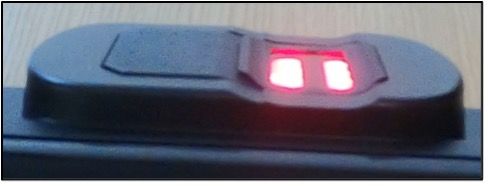
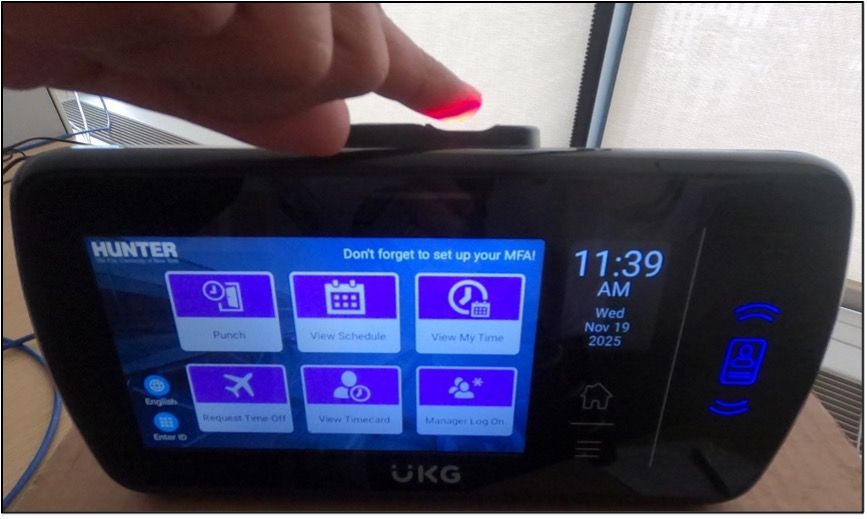
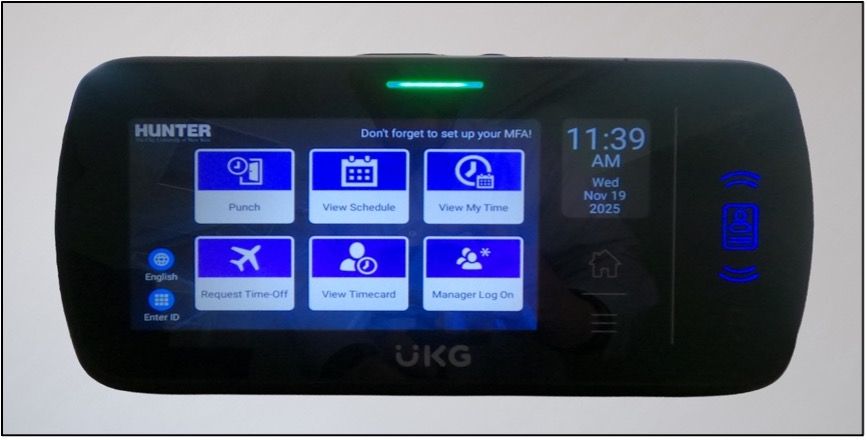
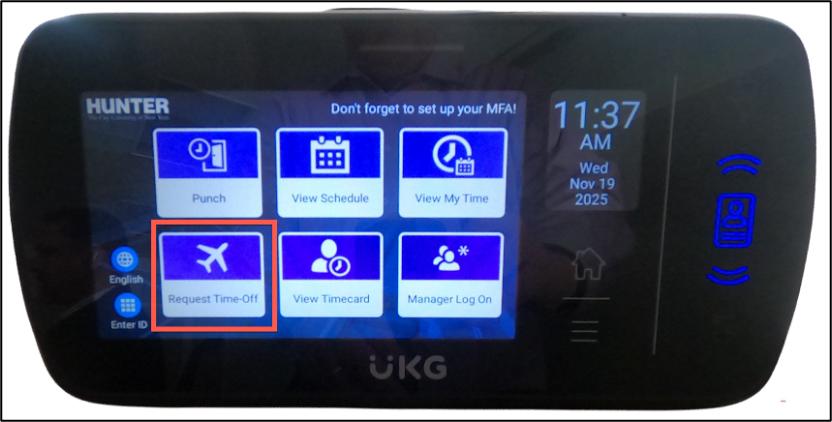
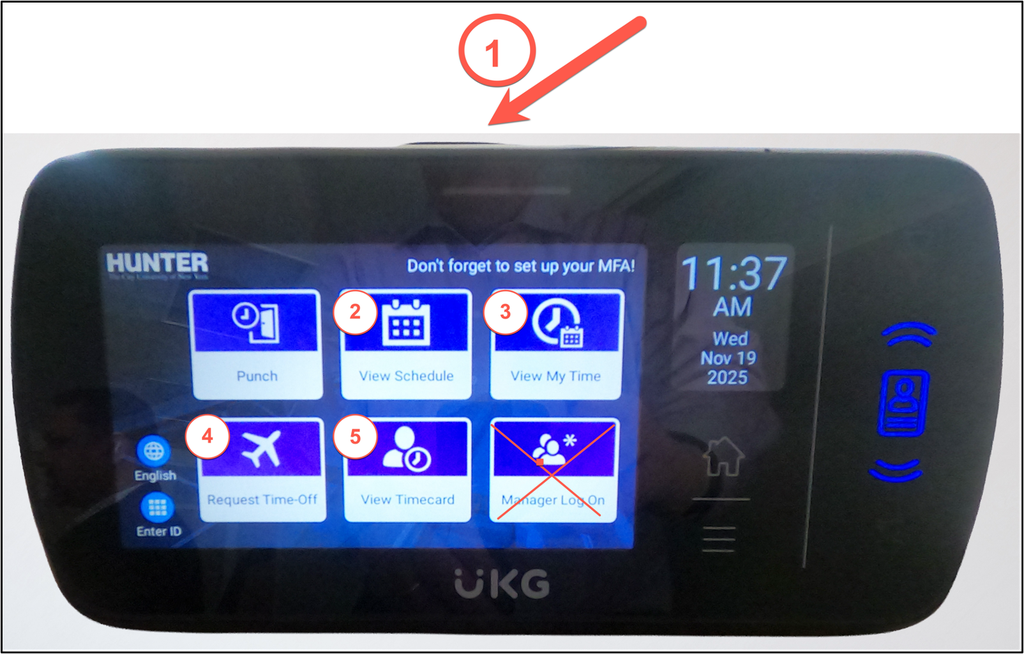
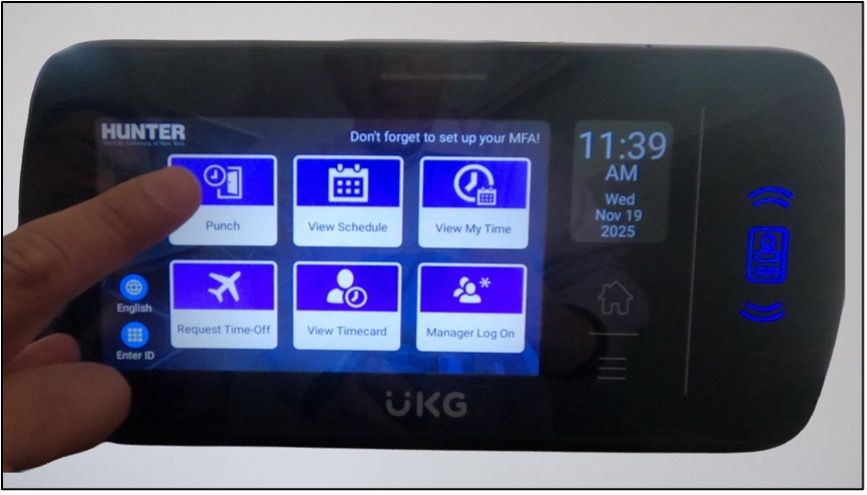
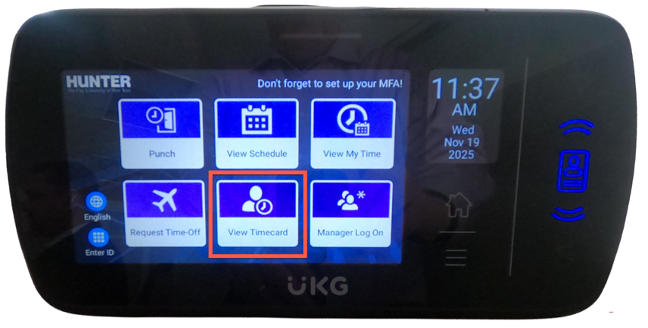
  1. Sensor – Touch the top of the Time Clock for the system to scan your fingerprint to clock in or out. 
  2. View Schedule – Touch the icon to see your schedule for the day, week or month 
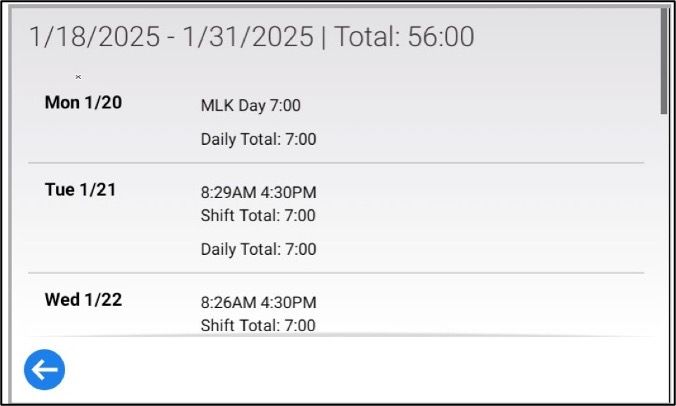
  3. View My Time – Touch the icon to see how many hours your have worked in the time period 
  4. Request Time-Off – Touch the icon to request the time you would like to take off. The time requested still has to be approved by a supervisor. 
  5. Your Timecard – This combines the features of 2 & 3. 
     
    *   Manager’s LogOn choice is disabled for employees. 


The Time Clock face looks like this when you arrive to clock in for your shift or when you clock out at the end of your day. 

  1. Touch your finger to the icon that says Punch. 
  2. Touch the top of the Time Clock with the finger (the one you used to set up your account profile) where the light is red. 
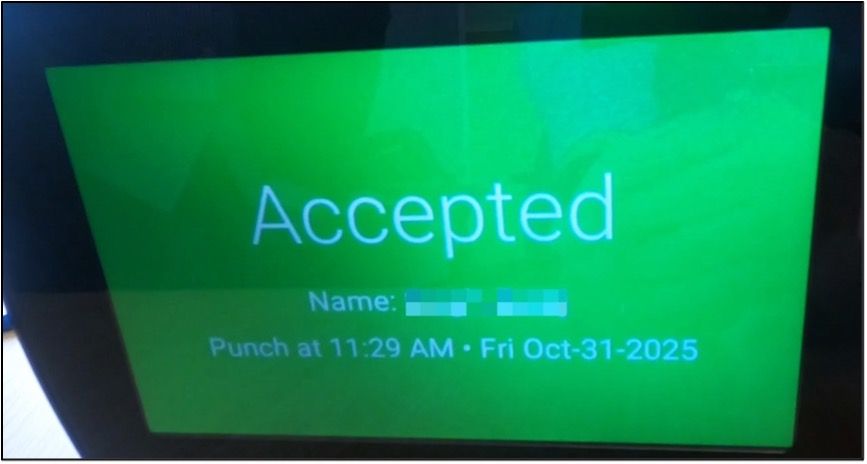
  3. If the system recognizes your fingerprint, a light on the front of the Time Clock will show green, a message will appear on the Time Clock Screen, and the system will register your time in or your time out. 
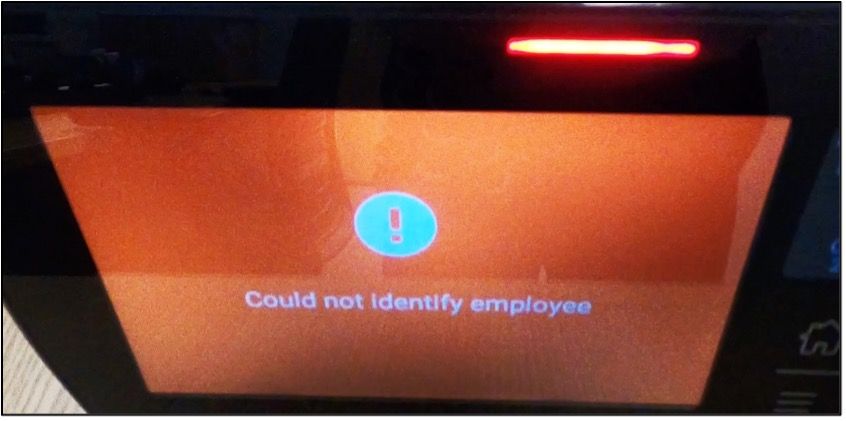
  4. If the system does recognize your fingerprint, you should repeat the process. If it continues to reject your fingerprint scan, contact your manager/supervisor. You may need to reset your account. 
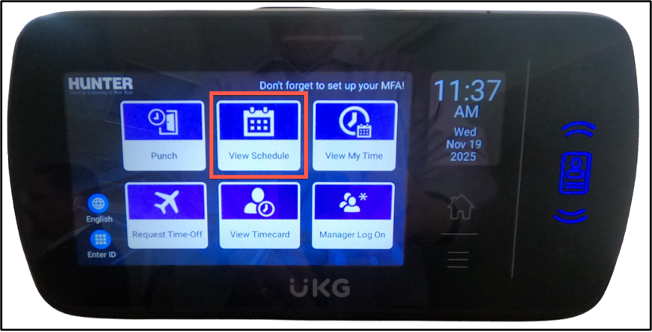
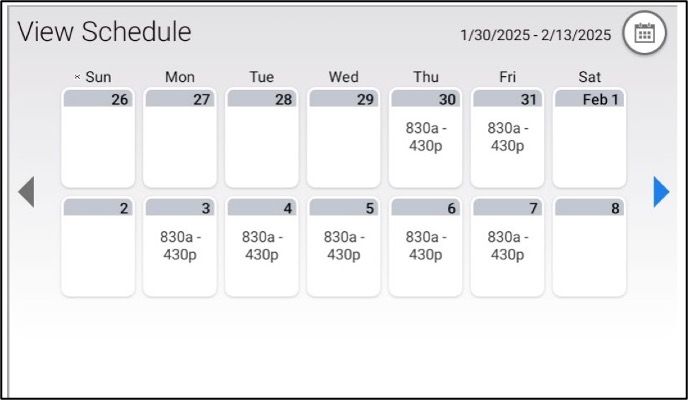
  1. Touch your finger to the icon that says View Schedule. 
  2. Your current schedule will show. Touch the arrows to view past and upcoming weeks. 
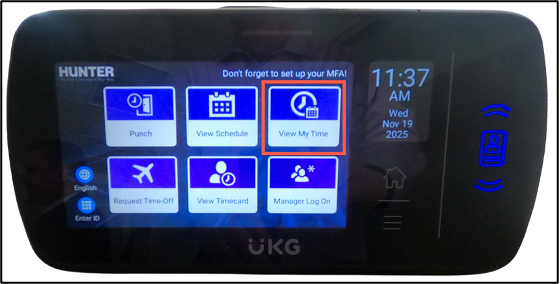
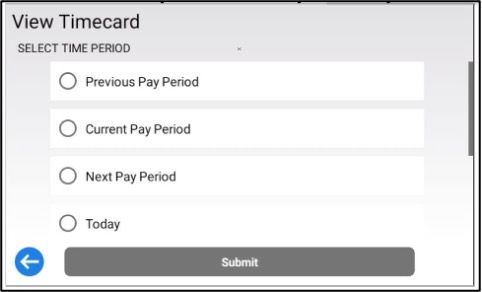
  1. Touch your finger to the icon that says View My Time. 
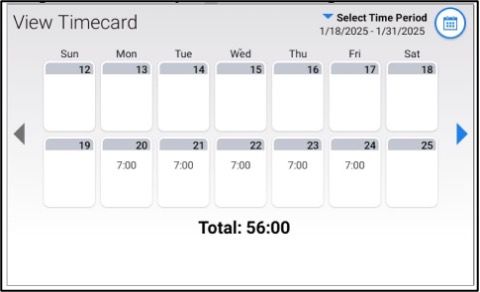
  2. The first screen allows you to choose the Pay Period that you would like to view. 
  3. Navigation arrows allow you to scroll left and right. 
  4. Tap any day above to view details. 
  5. Return to the Home screen by Tapping the “House” Button on the Time Clock. 
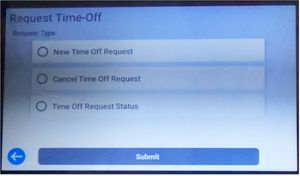
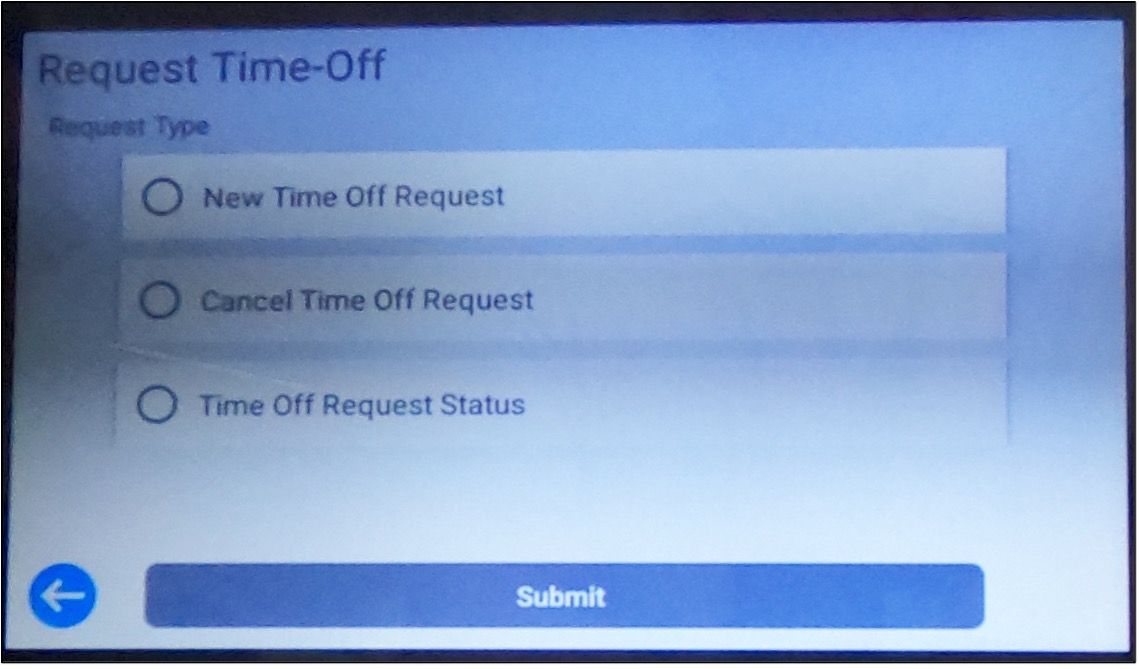
  1. On the Time Clock face, touch your finger on the icon that says Request Time Off. It will change to show your options for scheduling time off.
      1. New Time Off Request
      2. Cancel a previous Time Off Request
      3. Time Off Request Status (see if Time Off has been approved or is pending)
    • Touch the Submit bar icon.
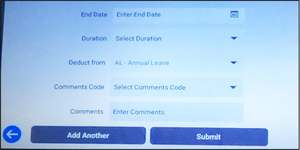
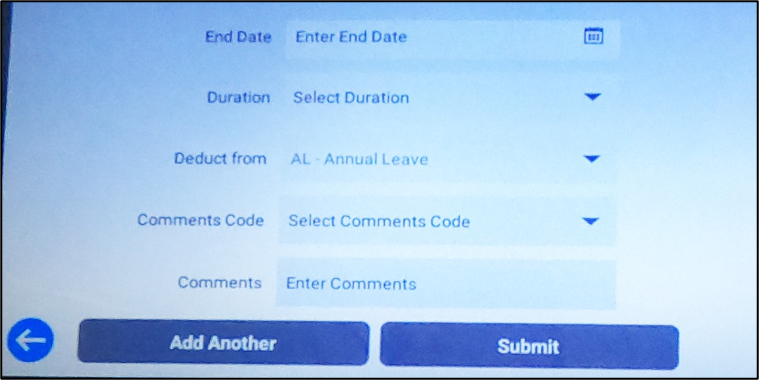
  2. Here is the information needed to make a request: 
    1. Enter the start date of your time off request 
    2. Enter the end date 
    3. Enter duration 
    4. Deduct from: 
      1. AL – Annual leave 
      2. Comp – Compensation days off 
      3. Sick – Sick Leave 
      4. Unscheduled Holiday 
    5. Comments Code (not available) 
    6. Enter comments if needed. 
  3. When finished, touch the Submit icon. Your request will be sent to your manager/supervisor 
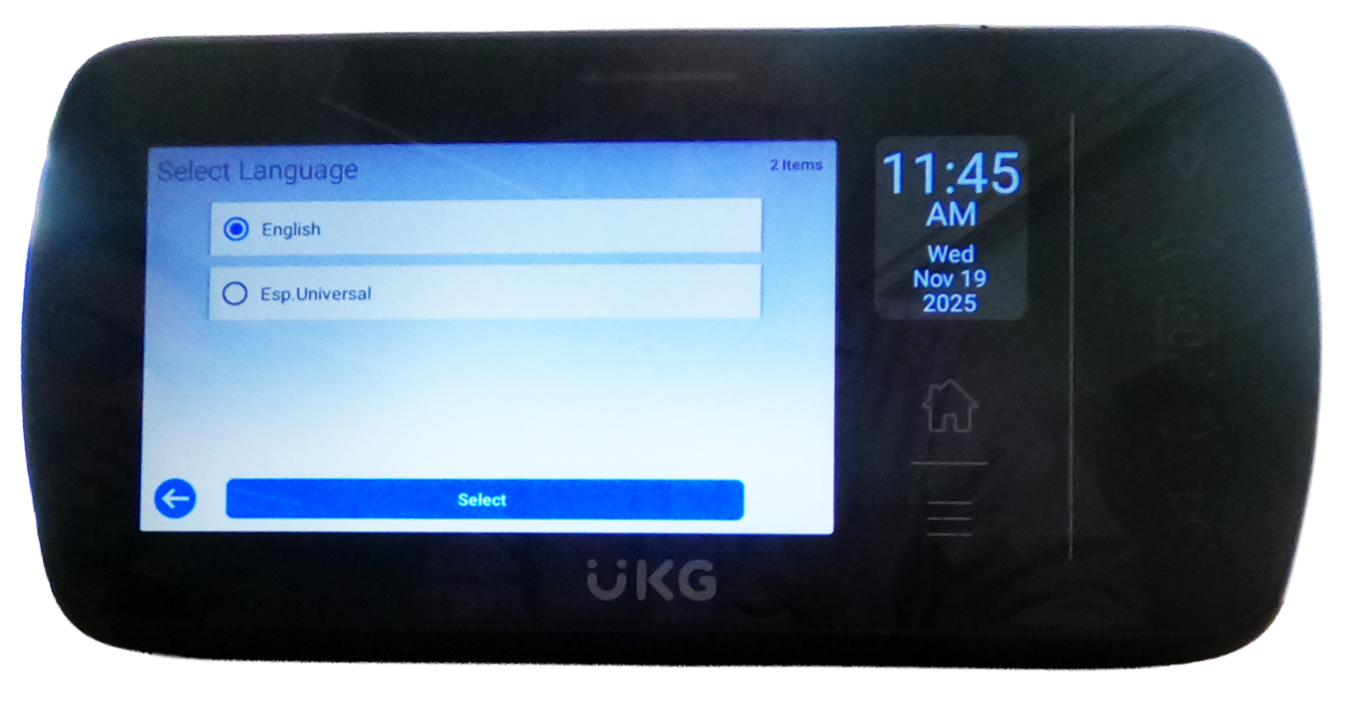
  1. To change the language on the Time Clock, touch the icon that says English. 
  2. A screen will appear with two choices: 
      1. English 
      2. Spanish (Español Universal) 
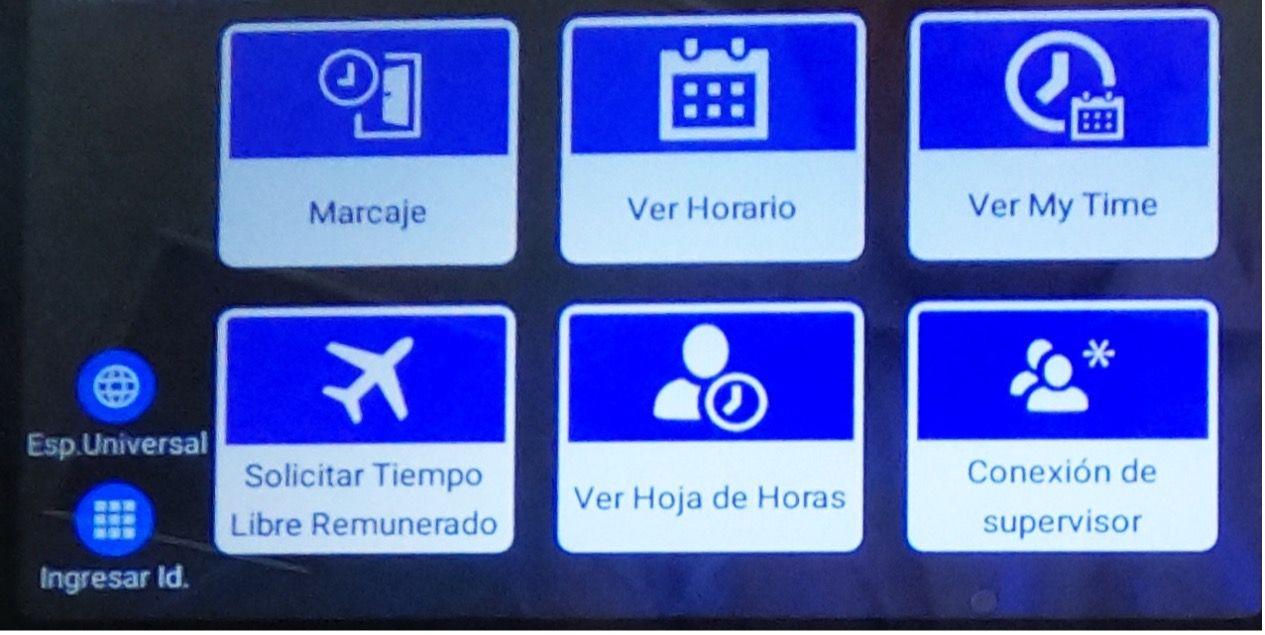
    • Touch the option to change the language to Spanish
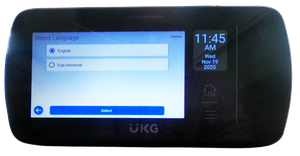
  3. The language on all screens and buttons will be in Spanish. 
HUNTER

Hunter College
695 Park Ave NY, NY 10065
(212) 772-4000

  • Facebook
  • Twitter
  • Instagram
  • Flickr
  • ABOUT
  • ACADEMICS
  • ADMISSIONS
  • EVENTS
  • NEWS
Hunter College Schools
  • School of Arts & Sciences
  • School of Education
  • School of Health Professions
  • Hunter-Bellevue School of Nursing
  • Silberman School of Social Work
  • School of Arts & Sciences
  • School of Education
  • School of Health Professions
  • Hunter-Bellevue School of Nursing
  • Silberman School of Social Work
Our Other Schools
  • Hunter College Campus Schools
  • Hunter College Continuing Education
  • Hunter College Campus Schools
  • Hunter College Continuing Education
Hunter College Libraries
More Info
  • Bookstore
  • Contact Us & Feedback
  • Jobs
  • Office of Career Success
  • Public Safety
  • Roosevelt House
  • Student Housing
  • Space Rentals
  • Bookstore
  • Contact Us & Feedback
  • Jobs
  • Office of Career Success
  • Public Safety
  • Roosevelt House
  • Student Housing
  • Space Rentals
Public Information
  • Annual Security & Fire Safety Report
  • Campus Hazing Transparency Report
  • Consumer Information
  • CUNY Tobacco Policy
  • Enough is Enough
  • Focus on Campus
  • Annual Security & Fire Safety Report
  • Campus Hazing Transparency Report
  • Consumer Information
  • CUNY Tobacco Policy
  • Enough is Enough
  • Focus on Campus
CUNY
  • © 2026 Hunter College
  • Accessibility
  • Privacy
  • Terms